Code till you … drop
Posts tagged netbeans
Interviewed for platform.netbeans.org + Greek JUG + Geertjan
Dec 15th
Interview
Greek JUG
Their presentations were excellent and it was clear that everyone in the audience enjoyed them! I can say the exact same thing for the other 2 presentations, from T.Varias and D.Andreadis.
Geertjan
Geertjan is a very interesting and pleasant guy. We arranged for some team coding in my house where we came up with the error-annotation support for the tapestry module. Here it is in action:
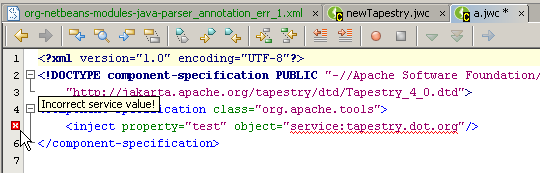
We had to call it a day quite early though, cause i was once more sleepless (+ a bit sick) ! I must have been coding with my eyes closed during the last half-hour : ) So, anyway, we’ll probably meet again next week, when i’ll be at Prague… should be fun!
Tacos 4.0.1 and Tapestry Support for Netbeans 5.5
Oct 30th
We had two tapestry-related releases today:
Tacos 4.0.1
Tacos 4.0.1 was released a few hours ago.
It’s mainly a stability release fixing 2 subtle bugs and
enhancing the ajax encoder (for very pretty and short ajax urls).
Make sure to also check out the previously undocumented but powerful
ajax-enabled Table component.
Thanks to all that contributed…
Changes:
* Docs for tacos:Table component.
* Load external js synchronously. Fixes Bug127.
* AjaxSubmit posts all the AjaxLinkSubmits before it. Fixes Bug130.
* Do not clear current document after error (a failed ajax-post).
* Jdk1.4 compatible class format for maven generated artifacts.
* Add StringToListConverter. Allows updateComponents parameter to be specified as a comma-delimited String.
* Add uniqueNames parameter in AjaxForm – forces the html name of each input control to stem from the component’s idPath (instead of the component’s id).
* Support validators and translator in HtmlArea. Fixes Bug128.
* Make buttons in tacos:Palette work. Fixes Bug129.
* Remove hardcoded class attribute from tacos:Table.
* Easier way for defining ajax exception and stale-session pages.
* Enhance AjaxDirectServiceEncoder for ever prettier ajax urls.
* Corrected links to tapestry’s component docs.
nbtapestrysupport
Just released the first version of nbtapestrysupport.
It provides:
- Hyperlink support in Tapestry configuration files for class names, files and libraries… CTRL+click everywhere!!!
- Autocomplete in Tapestry configuration files for class names, files and others
- Templates for new Tapestry files
Download the 2 nbms, then install the generic module first and then the tapestry module.
Enjoy!
Netbeans5.5Beta2 bundled with JBoss4.0.4 : No way to change server port
Sep 21st
Netbeans5.5Beta2 bundled with JBoss4.0.4 : No way to change server port
I’ve been playing a bit with Netbeans5.5, mostly due to Geertjan’s posts (esp. those describing how to build plugins supporting web frameworks). I even started nbtapestrysupport.
So, i’m on a new machine today and having decided to take a look at NB’s plugin support, i head for www.netbeans.org to download the 5.5 version. I’m however sidetracked with the plethora of the available installers… without thinking a lot, i go for the “NetBeans IDE 5.5 Beta 2 + JBoss Application Server 4.0.4 Bundle Installer“.
Installation went smoothly. After updating NB to include the subversion support, I was able to checkout from https://nbtapestrysupport.dev.java.net/svn/nbtapestrysupport/trunk/TapestryPlugin and build & run the project.
My next thought is ‘let’s see how well JBoss integrates’…so, going to the Runtime tab, right-clicking on JBoss and selecting Start results in “port 8080 already in use”. Oh well, there’s a background tomcat instance running on this pc, it shouldn’t be difficult to make jboss use another port, i.e. 7070.
Googling easily produces “change the following file:
server/xxx/deploy/jbossweb-tomcat55.sar/server.xml” and indeed, if i then issue “jboss_dir/bin/run.sh” it picks up the change and it works.
BUT, from within NetBeans it doesn’t and there’s no way to make it work… googling doesn’t help either… it’s as if there’s a hardcoded configuration somewhere inside NB’s JBoss integration code… Let’s look for a workaround then. Right click to “Add Server” and then browse to the JBoss installation folder is quite interesting. NB informs us that the configured port is 7070 (cool!) but also that ‘The domain instance you want to add already exists’ (sad but correct).
My question of course is, since the instance already exists and since it can indeed read the 7070 value, why doesn’t it use it ???
Anyway, I ended up renaming the instance (just a folder rename) which allowed me to add the server in the previously described way. And this leaves us with:
Why, oh why, can’t I delete (or even rename) the original (and non-working) JBoss server registration ???
